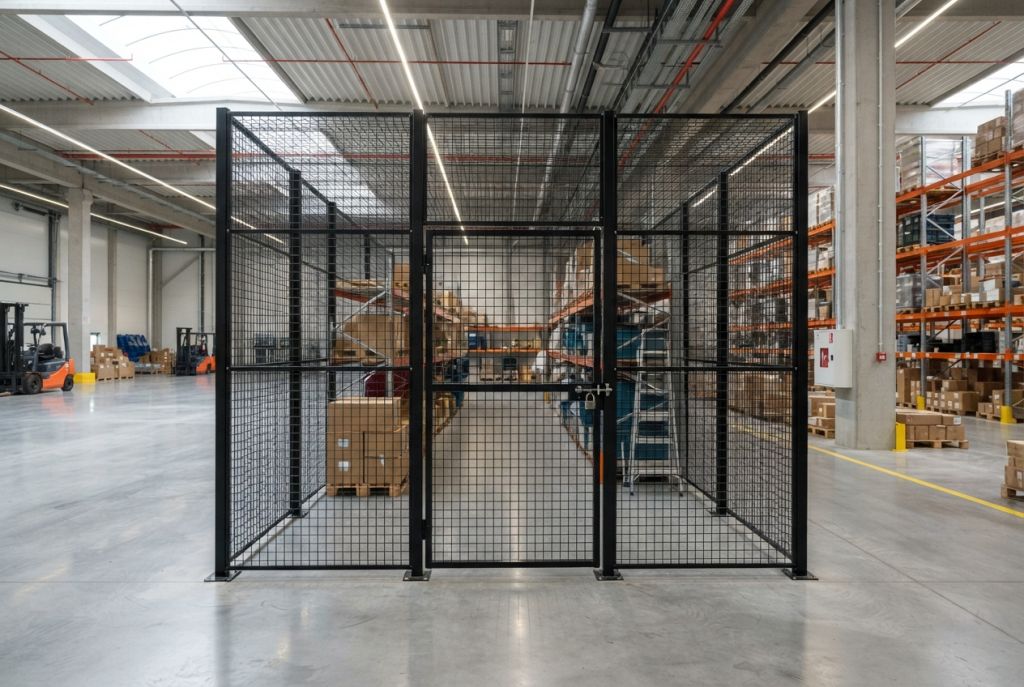
If you're planning a server room right now, the biggest mistake is treating security like a single door decision. Good server room security design starts with access risk, then balances cages, airflow, maintenance clearance, and monitoring sotheroom stays secure without becoming hard to operate.
If several teams, vendors, or maintenance staff need to enter the same area, a locked room usually isn't enough. A better plan creates layers inside the room, so people can reach what they need without gaining access to critical equipment.
H2: Why Server Room Security Design is a Business Priority
A server room supports much more than hardware. It supports uptime, internal operations, compliance efforts, and incident response. When the physical layout is weak, problems show up fast. People take shortcuts, access becomes harder to control, and simple service work can expose sensitive equipment.

Poor layout also creates costs that don't look like security costs at first. You may need to move cable pathways, change doors, rework cooling, or retrofit barriers after equipment is already live. Those changes are usually harder on active IT spaces than they are on paper.
Security problems become operating problems
A secure room should help staff work clearly and consistently. It shouldn't force them to choose between accessand protection. When teams don't plan for visibility, service paths, and equipment separation, they often end up with one of two bad outcomes:
- Too much access: Too many people can reach racks, cables, or storage media.
- Too little usability: Authorized staff can't service equipment cleanly without opening protected areas wider than intended.
A secure server room works best when physical protection supports routine work instead of fighting it.
Business continuity planning matters here too. If you're also reviewing disaster recovery strategy, this overview of Orlando data center recovery is a useful companion read because it frames how physical room decisions affect recovery readiness.
Early planning prevents ugly retrofits
The most practical reason to plan early is simple. It's easier to place cages, define access zones, and protect airflow before the room gets crowded. Once racks, cooling units, and cable runs are in place, every change gets slower and more expensive.
That is why server room security design should be treated as a business planning task, not just a facilities add-on.
H2: Start with Room Layout and Access Points
The first thing to audit isn't the cage. It's the room itself.
Before you choose a server room security cage or sketch a server room cage layout, identify every path someone can use to approach, enter, or work near the equipment. That includes the main door, side access, shared utility paths, ceiling access, maintenance routes, and any space where non-IT personnel may need to pass through.
Map real access, not ideal access
On paper, a room may look secure because it has a lock. In practice, the room may still be exposed if it sits in a shared space or if several groups enter it for unrelated tasks. That is common in mixed-use facilities where IT equipment shares space with maintenance, telecom, or building systems.
Start with these questions:
- Who enters today: IT staff, vendors, electricians, HVAC technicians, cleaning crews, or building management.
- Why they enter: Server work, cable installs, power service, cooling service, inspections, or unrelated building tasks.
- What they can reach: Only the door area, or direct access to racks, patch panels, and media.
- Where they move: Straight to assigned equipment, or through the full room.
Practical rule: Design around actual traffic patterns. A room that is technically locked can still be operationally open.
Room placement affects security and uptime
Environmental guidance also shapes the starting layout. Best practice guidance recommends placing server rooms away from exterior walls, windows, basements, wet walls, and vibration sources, with preference for the building core when possible for easier cable distribution and lower exposure to weather or plumbing failures, as outlined by PhoenixNAP's server room design guidance.
That advice matters because a room with the wrong location creates more than climate risk. It can also introduce more maintenance traffic, more emergency intervention, and more chances for uncontrolled access during service events.
A strong design starts by deciding where the secure zone should begin, not just where the racks will sit.
H2: How Server Room Cages Create a Layered Defense
A locked room helps. It just doesn't solve the whole problem.
Modern guidance commonly uses a four-layer defense-in-depth model made up of perimeter security, facility controls, computer room controls, and cabinet controls. The purpose is to deter, detect, and delay unauthorized entry, and that matters because insider threats account for approximately 60% of security incidents according to ISA's physical security guidance for data centers.

Why a cage changes the room
A server room security cage adds an inner boundary inside the room. That changes security in a practical way. It separates general room access from equipment access. In shared spaces, that distinction is often the difference between acceptable controland constant exposure.
A cage is especially useful when:
- The room is shared: Maintenance or vendors need room access, but not rack access.
- The equipment is high value: You want another layer around core servers, storage, or network gear.
- Audits matter: A defined physical boundary makes restricted areas easier to explain and enforce.
- Visual control is important: Staff can see what is restricted instead of relying on informal rules.
For teams comparing options, data center security cages are often used to create those controlled internal zones without rebuilding the whole room.
A door secures the room. A cage secures the assets.
That is the practical difference.
Without a cage, anyone who gets intotheroom may also reach the equipment. With a cage, authorized room accessand authorized equipment access become two separate decisions. That supports cleaner separation between IT work, facility work, and vendor activity.
In most retrofits, the biggest improvement isn't making the room harder to enter. It's making the equipment harder to reach once someone is inside.
That is why a data center security cage or colocation cage often becomes the most useful layer in real-world server room security best practices.
H2: Server Room Cage Layout and Airflow Best Practices
A good cage layout protects equipment without choking the room. Security only works if the layout still supports cooling, service access, cable routing, and future growth.
The best server room cage layout is usually simple. Keep the protected area tight enough to control access, but not so tight that techs can't work safely or airflow gets blocked. Mesh partitions help because they preserve visibility and allow air movement better than solid barriers.
Plan around racks, aisles, and service paths
Think about the room in three paths. Air path. People path. Cable path.
If one of those paths is ignored, the layout starts to fail in daily use. A cage that blocks a cooling pattern or crowds a rack face may look efficient on the drawing but create service problems later.
| Design Factor | Why It Matters | Planning Tip |
|---|---|---|
| Cage footprint | Controls how much equipment is protected and how much free room remains | Size the cage around current equipment plus reasonable expansion space |
| Door placement | Affects entry flow, service access, and emergency movement | Place doors where staff can enter without crossing other work zones |
| Mesh panel design | Impacts visibility and airflow | Use open wire partitions that preserve sightlinesand support room airflow |
| Rack clearance | Determines how easily equipment can be serviced | Maintain clear working space at rack frontsand rears |
| Camera sightlines | Helps detect activity inside and around the cage | Avoid panel layouts or corners that create blind spots |
| Cable entry points | Reduces tampering and service confusion | Decide early where overhead or underfloor cable access will enter the secure zone |
| Growth allowance | Prevents expensive rework later | Leave room for additional racks, doors, or segmented zones if the IT footprint may grow |
Cooling can't be an afterthought
Environmental guidance recommends maintaining rack inlet temperature at or below 23°C (73°F) and relative humidity around 50% ±10%, while another source recommends a room range of 68–71°F (20–22°C), as summarized in PhoenixNAP's server room design recommendations. Those targets only help if your layout allows air to move where it needs to go.
If your facility team is also reviewing system sizing or room conditioning upgrades, this overview of Tucson commercial HVAC solutions gives helpful context on planning around equipment heat loadsand building conditions.
Use layout support before you buy steel
A cage should fit the room, not force the room to fit the cage. That's why early design help matters. Some buyers start with dimensions only, then discover late that doors, swing clearance, cable drops, or cooling paths weren't considered.
If you're comparing concepts, this guide to designing server cages is a useful starting point for thinking through cage size, placement, and room flow before hardware is ordered.
H2: Integrating Access Control, Fire Safety, and Compliance
Physical barriers work best when they are tied to access rules, monitoring, and code review. A cage without clear entry control is only a partial solution.
Industry guidance treats server room security as a standards-driven discipline shaped by frameworks such as ISO 27001 and NIST SP 800-53. That approach emphasizes least privilege access, auditable logs, and coordination with IT, facility, and fire safety teams, as described in BMC's secure server room overview.

Match the lock totherisk
Some server rooms need keyed access only. Others need card credentials, mobile credentials, or biometrics tied to audit logs. The right choice depends on who enters, how often they enter, and whether room access should be different from cage access.
For a plain-language overview of how organizations secure your business with access control, that resource is a helpful companion when comparing entry methodsand audit needs.
Useful controls often include:
- Separate room and cage permissions: A person may need room access without cage access.
- Event logging: Entry events should be traceable during audits or investigations.
- Camera coverage: Doors, aisles, and cage perimeters should remain visible.
- Environmental monitoring: Temperature, humidity, smoke, and leak alerts should be visible totheright team.
Fire and code review need real coordination
Cage layouts should never be treated as universal code solutions. Final designs should be reviewed with the facility team, IT team, fire marshal, and local code authority when needed.
That includes door egress, suppression compatibility, clearances, and whether the room uses clean-agent or inert-gas fire suppression rather than water discharge. If you need details on panel types, locking options, and enclosure components, security cage specifications can help frame that discussion with your internal reviewers.
Security that can't be serviced, monitored, or approved by the right stakeholders won't hold up in operation.
H2: Common Server Room Design Mistakes to Avoid
Most server room problems don't come from a lack of intent. They come from narrow planning.
A common pitfall is failing to plan for resilience. Guidance recommends placing server rooms away from exterior wallsand basements, maintaining inlet temperatures around 23°C (73°F), ensuring UPS capacity can power security systems for at least 15 minutes during an outage, and reserving expansion space to avoid costly rework, according to PhoenixNAP server room design guidance.
The room has a lock, so we're done
This is the most common wrong assumption. A locked room does not solve shared access, internal tampering risk, or accidental contact with sensitive equipment.
Fix it by creating layers inside the room. That may include a server room security cage, segmented access, and better visual boundaries.
The cage fits, so the layout works
A cage can physically fit and still be wrong. Tight clearances, poor door placement, and blocked service zones create daily friction. Then people prop doors, skip procedures, or postpone maintenance because the room is awkward to use.
Fix it by planning around maintenance paths before finalizing dimensions.
Cooling and power are separate from security
They aren't. If cooling fails, staff may need emergency access. If backup power drops, cameras, locks, and alarms may lose visibility at the worst time.
Fix it by planning for degraded operation. Decide how access control, surveillance, and alerting will function during outages or HVAC events.
No room for growth
Crowded server rooms age badly. As racks, cabling, and accessories increase, a once-clean layout turns into a clutter problem that is harder to secure and harder to maintain.
Leave enough room for the next phase while the room is still easy to change. Waiting usually means more downtime and more rework.
That is where buyers often lose time. Early layout planning usually gives you cleaner install windowsand fewer late design changes.
H2: 5-Step Checklist for Your Server Room Security Design
Use this checklist to move from rough idea to a layout your teams can review and build.

The five steps
-
Audit access points
Identify doors, shared paths, ceiling access, and any route that exposes equipment. -
Define security zones
Decide what should be open room space, what should be restricted, and what needs cabinet or rack-level protection. -
Lay out the cage and aisles
Position the cage for service access, camera sightlines, cable routing, and airflow. -
Connect security systems
Tie access control, cameras, and environmental monitoring into a process your staff can use. -
Review for code and growth
Confirm the layout with IT, facilities, and fire safety stakeholders, and leave room for expansion.
Use the checklist for different room types
The same sequence works whether you're securing a small IT room, a larger server area, or a shared space that needs a colocation cage approach. What changes is scale, not the planning logic.
H2: Key Questions to Ask Before Your Layout Consultation
A good consultation goes faster when you show up with the right answers. The goal isn't perfect drawings. It's a clear picture of risk, access, and operating needs.
Bring these questions to the table
- How many racks do we need now and later
- Who needs access totheroom and who needs access to the equipment
- Is the room dedicated or shared with other building functions
- Where do cables enter and exit today
- How is cooling delivered across the room
- Are there fire, egress, or building review requirements we already know about
- Do we need a full data center cage design or a smaller enclosed zone
- Do we want room accessand cage access controlled separately
Match the layout to the buying path
If you're still evaluating enclosure options, security cages for server and equipment protection can help you compare general solution types before final layout work begins.
If you already know the room needs a dedicated protected zone, gather dimensions, photos, rack counts, and door locations before requesting design support. That makes the first review more usefuland reduces back-and-forth.
For projects that need planning help, design your server room security layout with a free consultation. You can also Request a Quote, Contact Us, or Call (800) 326-4403 to discuss layout options.
H2: Frequently Asked Questions About Server Room Security
Can an existing room be retrofitted with a server room security cage
Yes, many existing rooms can be retrofitted. The key issue is not just floor size. You also need to check door swing, ceiling conditions, cable routes, cooling paths, and who still needs access around the enclosure.
What's the difference between a server room cage and a full room buildout
A cage creates a secure zone inside an existing room. A full room buildout changes the room itself. Cages are often a practical choice when the room is already built and the goal is to restrict access around specific equipment.
Are cages useful in shared IT or maintenance spaces
Yes. Shared spaces are one of the clearest use cases. A cage helps separate server access from general room access, which is especially useful when vendors or facility staff must enter the room for other reasons.
Can a cage work in a colocation-style setup
Yes. A colocation cage can divide a larger room into controlled sections for different users, business units, or equipment groups. The layout needs clear door control, visible boundaries, and enough working clearance for each zone.
Will a cage block cooling
It can if the layout is poor. Open wire mesh helps support airflow and visibility, but placement still matters. The cage should work with the room's cooling pattern, not interrupt it.
What if the room has a drop ceiling
That needs closer review. Ceiling conditions affect how fully enclosed the protected area should be and whether there are alternate access paths above the partition line. Ceiling details should be included early in the design discussion.
Do we need separate access control for the room and the cage
Often, yes. Separate permissions are useful when some staff need room access for building or service work but should not have direct access to servers.
What should we prepare before asking for a quote
Bring room dimensions, rack counts, photos, door locations, known access issues, and any cooling or code concerns. That makes it easier to build a layout that reflects how the room is used.
A well-planned server room security design doesn't stop at locking the door. It creates layers that protect equipment, support cooling, preserve maintenance access, and make audits easier. If you're weighing a server room cage layout, a data center cage design, or a retrofit for a shared IT space, Material Handling USA can help you review optionsand plan the layout before hardware is ordered. To get started, Request a Quote, Contact Us, or Call (800) 326-4403. Earlier planning usually means smoother installs, fewer layout revisions, and better use of your project timeline.