
Automated Maintenance Spare-Parts Storage: VLM vs Carousel
A selection guide for maintenance managers comparing system fit, urgent-stock access, released repair kits and inventory-system responsibilities.
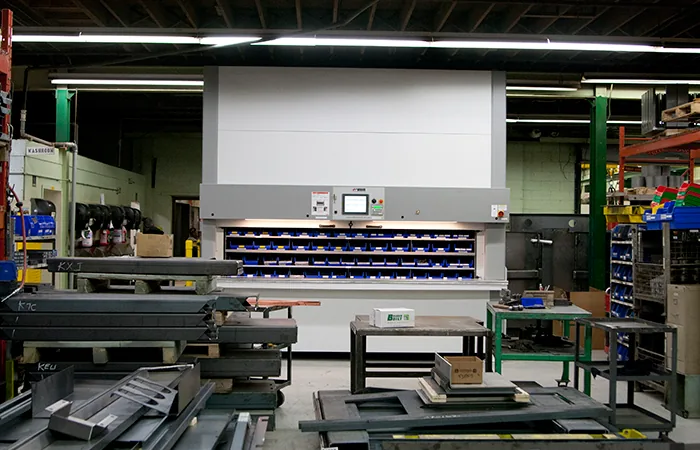
Choose automated spares storage around the failure scenario
Maintenance spare-parts storage is not a smaller version of a production picking operation. A seal requested during a breakdown may matter more than hundreds of routine picks, while an expensive assembly can sit untouched for months. The right comparison therefore starts with access consequences, item geometry and the mix of planned and unplanned work—not a blanket promise that automation improves every part of the storeroom.
This guide compares a Vidir vertical lift module, Pan Carousel and Shelving Carousel as candidates for compatible inventory. Our Vidir vertical storage solutions hub covers the wider range. The existing tool-crib and die/mold storage page remains the destination for tool issue and heavy tooling; this guide focuses on the cross-system access and downtime decision for spare parts.
Segment the storeroom before comparing machines
Critical repair spares
Identify the asset served, acceptable retrieval delay, substitution policy and the response when normal equipment access is interrupted. Rare use does not mean low consequence.
Planned-maintenance kits
List the work-package contents, revision and release status. Decide whether a complete kit or individually issued parts should be stored and replenished.
Routine consumables
Record pick frequency, replenishment effort and package sizes. Compare automation with simpler accessible storage rather than assuming the entire category belongs inside a machine.
Held or uncertain material
Separate inspection holds, returns and questionable parts from released inventory. Define who authorizes release; a storage location is not an inspection decision.
Bearings, seals, controls and repair kits are examples of item groups to evaluate, not a verified universal compatibility list. Review dimensions, weight, packaging and special handling individually. Utility and data-center spares are proposed workflow examples here, not claimed MH-USA installations or qualifications.
VLM versus Pan or Shelving Carousel
| Planning question | VLM | Pan Carousel | Shelving Carousel |
|---|---|---|---|
| How is inventory carried? | Evaluate tray arrangement and the storage height needed by each load. | Evaluate small-part containers and pan organization. | Evaluate shelf-carried inventory and its containment. |
| What should the sample include? | Tall and low items, concentrated loads and the most awkward package. | Divided bins, small cartons and the containers actually used. | Cartons and parts with different footprints and movement constraints. |
| What can slow the workflow? | Tray selection, operator work at the access area and replenishment. | Carrier travel, locating the correct bin and container handling. | Carrier travel, locating the package and safe transfer. |
| What must be quoted explicitly? | Tray layout, loads, access configuration, controls and integration scope. | Pan layout, loads, containment, controls and integration scope. | Shelf layout, loads, containment, controls and integration scope. |
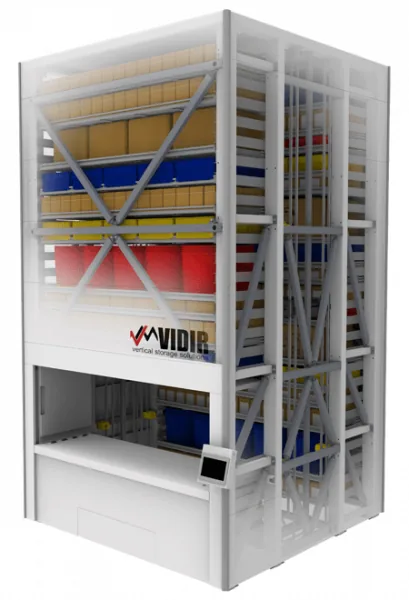
This is a selection framework, not a specification table. Do not transfer carrier ratings, machine dimensions or software features between systems. Vidir’s VLM uses an extractor to handle trays; vertical carousels circulate carriers. The practical question is which arrangement handles the measured inventory and busiest work sequence with acceptable access consequences.
Write an urgent-access plan before consolidating stock
Imagine the most consequential repair request during an off-hours shift. Who identifies the correct part? Who is authorized to retrieve it? What if the regular storeroom attendant is absent, the network is unavailable or the storage equipment is out of service? Include the physical access and the inventory record in the same scenario; being able to find a part number on a screen is not the same as reaching the part.
Ask the equipment provider to explain the proposed system’s documented service and interruption procedures. Agree on the responsible support contact, escalation route, expected staffing and training scope. Do not assume a general emergency-release mechanism or unrestricted manual access to all stored inventory.
A risk review may point to a hybrid layout: selected urgent stock in a separately reviewed accessible location, automated storage for suitable inventory, and another zone for oversized or specialized parts. That is a planning option, not a recommendation to bypass security or store duplicate stock indiscriminately. Your maintenance and operations teams should decide the acceptable access risk for each item class.
Define where inventory and work-order authority live
A maintenance system may own the asset and work order, an ERP may own purchasing and valuation, and machine software may guide a storage transaction. Name the source of truth for each field before asking for an integration. Otherwise “real-time inventory” can hide conflicting counts, incomplete returns or a part reserved in one system but available in another.
Vidir’s current Vantage page documents tray/location inventory, guided pick and stock, role-based access, transaction history and ERP/WMS integration. That does not establish compatibility with every maintenance platform, a completed connector, automatic quality release or turnkey work-order management. Confirm hardware compatibility, licensing, deployment and the actual data exchange in the quotation.
- Part identity: approved item number, manufacturer reference and unit of issue.
- Work demand: work order, reserved quantity and the person authorizing issue.
- Status: released, reserved, awaiting inspection or rejected, with a named owner.
- Transaction: quantity issued or returned, location and required user/time record.
Include an interrupted-transaction rule. If an operator retrieves a part but the confirmation fails, decide who reconciles the physical movement and the record. Test that process rather than assuming the integration resolves every exception automatically.
Keep kit completeness separate from part availability
For planned maintenance, compare storing a complete released kit with picking its components for each job. Preassembled kits may simplify a handoff but consume space and can hide short items if the kit label is treated as proof of completeness. Component picking avoids some duplication but moves the checking burden closer to the job.
Use a controlled kit list, identify substitutions through your normal approval process, and decide when the kit is sealed or marked ready. A returned unused kit needs a condition and completeness decision before it becomes available again. Partial returns should not silently restore the full kit quantity.
Photograph awkward items and their packaging for the layout review. Keep protective packaging and any material-specific requirements attached to the part record. Hazardous materials, batteries, contaminated items and environmentally controlled stock require separate evaluation; ordinary spare-parts suitability is not evidence for those storage conditions.
Compare the complete operating day
Build the inventory sample
Measure representative items, containers, weights and pick history; flag critical spares separately.
Run normal work
Include issue, replenishment, returned parts and planned kit preparation, not retrieval alone.
Run a disruption
Review urgent demand, missing staff, equipment downtime and a failed inventory confirmation.
Compare whole-life scope
Review the full layout, labor steps, training, support, software and maintenance—not machine footprint alone.
Measure the proposed workflow using the same sample for each option. Record queueing at the access area and the time spent identifying, checking and transferring the part. A nominal machine travel speed is not a complete parts-issue rate. If critical assumptions remain unresolved, keep them visible in the project review rather than converting them into a savings claim.
Send us a representative inventory file, a floor plan, photographs, peak simultaneous requests and your urgent-access criteria. We can review a cross-system storage approach while your team retains authority over maintenance priorities, part release and emergency operating policy.
Get a storage project review
Send your item list, room dimensions, handling photos and the workflow you need to improve. We can review system fit and the details required for a project-specific quote.
Frequently asked questions
Is a VLM always the best choice for maintenance spares?
Should all critical spares be placed in automated storage?
Does Vidir Vantage replace our maintenance management system?
Can returned repair parts go directly back into available stock?
What is the difference from a tool-crib storage guide?
Shop packaging and shipping supplies
For routine packing and shipment preparation. These supplies are not Vidir systems or replacement parts.



Review your storage workflow
Share the inventory, layout and operating requirements so we can discuss a project-specific approach.