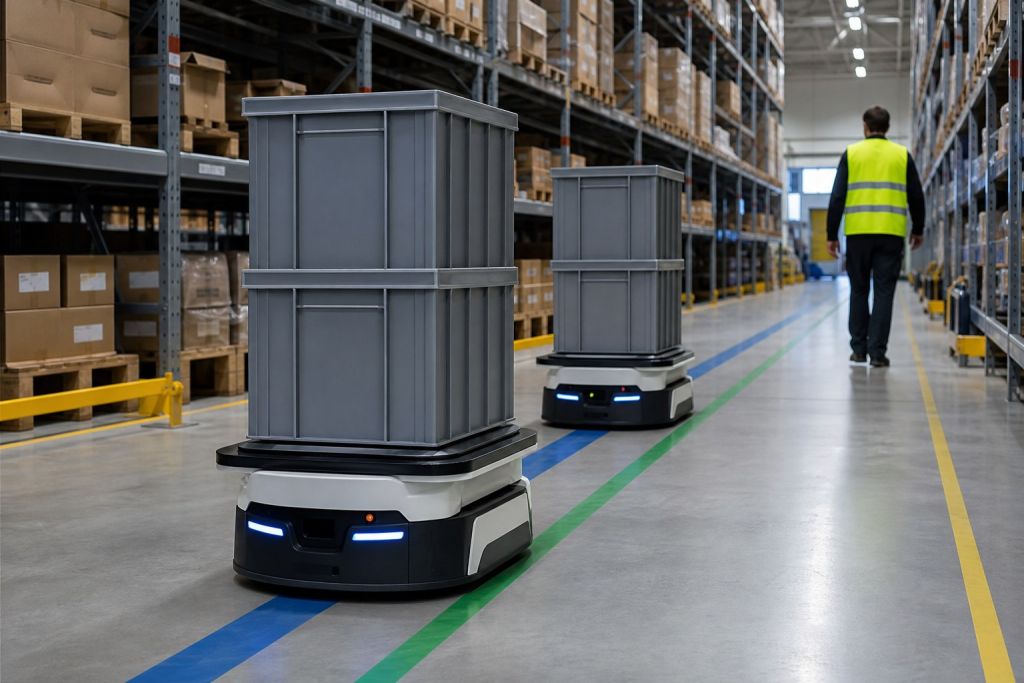
Warehouse automation uses software, data capture, and equipment to help move, store, pick, and ship goods with less manual handling. It can be as simple as barcode-directed work and system-driven tasks, or it can include conveyors, sortation, automated storage, and mobile robots. The right starting point depends on the bottleneck, the product, and the building.
A busy shipping dock makes the need obvious. When cartons pile up, picks slow down, and inventory counts drift, managers start looking for ways to move work with less walking, fewer errors, and tighter control. That is where warehouse automation stops being a nice upgrade and starts acting like a facility design decision.
What Warehouse Automation Means and Why It Matters Now
A warehouse can look “automated” in several different ways. One operation may use barcode scanning and software to remove paper from receiving, while another may run conveyors, robots, and automated storage equipment across the floor. The common thread is straightforward, automation takes repeat work away from people and gives the facility more consistent control over movement, storage, and order flow.
A warehouse is no longer judged only by what equipment it owns. It is judged by how well the building, the software, the process rules, and the material flow fit together. That is the hidden part many buyers miss at first, because automation is often treated like a purchase order for machines instead of a facility design decision that can expose weak layout choices, underbuilt data infrastructure, and process gaps.
The market size shows how far this shift has moved. Grand View Research estimates the warehouse automation market will grow from USD 19.2 billion in 2023 to USD 27.4 billion in 2026 and USD 59.5 billion by 2030, with an 18.7% CAGR over 2024 to 2030 (Grand View Research).
A practical way to think about it
Warehouse automation works like a nervous system for the building. Sensors collect facts, software decides what should happen next, and equipment carries out the work. Without that link, a robot is only a machine moving around, not part of a controlled operating system.
Practical rule: If a warehouse still depends on paper, memory, and guesswork to keep inventory moving, automation usually starts with process control before it starts with heavy equipment.
That is why many managers use automation to answer three pressure points at once, labor, throughput, and accuracy. The goal is not to replace every worker. The goal is to remove wasted motion, reduce rework, and make the building easier to run.
If you are starting a planning conversation, Material Handling USA’s smart warehouse automation design guide is a useful next step for seeing how layout and equipment choices fit together.
How Warehouse Automation Works as an Integrated System
Warehouse automation works only when the building is designed as one connected system. The scanner at receiving, the software that updates inventory, and the conveyor or robot that moves the item all need to follow the same rules. If one layer is out of sync, the entire operation feels it, even when the equipment itself is working as designed.

From data capture to physical movement
A useful way to understand the flow is to separate it into three jobs. Sensing and data capture gather the facts, control logic decides what should happen next, and motion equipment carries out the task. The warehouse management side coordinates work from receiving through shipping so the right item reaches the right place at the right time, as described by Cleverence.
That is why standalone equipment can disappoint buyers. A conveyor that moves cartons quickly still needs rules for where those cartons go. A robot that travels across the floor still needs inventory data and task assignments. The software layer gives the hardware a job, just as a floor plan gives a building a purpose.
A warehouse is a facility design decision as much as an equipment purchase.
The warehouse should decide the route, not the machine.
For teams that want a clearer hardware example, conveyor systems show how physical movement depends on upstream control. They also show why layout, transfer points, and product flow all need to be checked before the first machine is installed.
Integration separates good setups from great ones
This layered setup also explains why integration matters so much. WMS, WES, and WCS are not just acronyms, they are the tools that keep inventory flow coordinated. When they are connected properly, the system can handle receiving, putaway, replenishment, picking, packing, and shipping with fewer handoffs and fewer chances for a mismatch between what the software expects and what the floor is doing.
That is also where hidden infrastructure costs show up. Power, network coverage, floor conditions, and process discipline all affect whether automation performs like a controlled system or a collection of separate machines. Buyers who skip that review often discover that the equipment is only one part of the project, and that process maturity matters just as much as the hardware list.
For engineers or buyers who want a manufacturing-side reference point, serial production parts for robotics is a useful comparison for how repeatable parts support repeatable automation.
Core Technologies That Power Automated Warehouses
A warehouse automation project is usually a facility design decision first, and an equipment purchase second. The right tools depend on what the building needs to do, how the work already flows, and how much process discipline the operation can support. A sorter, a robot, or a software platform can all help, but only when they fit the job they are meant to perform.
What each category is good at
WMS and execution software work like the traffic controller for the operation. They do not move a carton themselves, but they decide where work goes, what gets priority, and which task should happen next. Conveyors suit steady, repeatable product movement. Sortation fits operations that need items routed into different lanes, destinations, or shipping paths.
AS/RS units function like high-density libraries for cartons or parts. They are useful when floor space is limited and inventory needs to stay in a controlled location with a clear access pattern. A buyer who needs that kind of dense storage can review automated storage and retrieval systems as a reference point for how storage density and retrieval control work together.

Robotics adds another layer. Picking robots handle repetitive item movements, while AMRs transport materials across the floor without fixed guide paths. AGVs still make sense where routes are predictable and the process does not change often. Sensors and identification tools keep the data accurate so the software knows what is happening in the building.
Adoption is already broad
The scale of adoption shows that warehouse automation is no longer a future idea. Buyers are comparing systems that are already working in live operations, which makes the choice less about whether automation exists and more about which design fits the building, the process, and the labor model.
That is why process maturity matters as much as hardware. A warehouse that wants to reduce stockouts with AI still needs clean item data, disciplined replenishment rules, and a system layout that can support the promised visibility. Automation and inventory accuracy rise or fall together when the underlying process is weak.
Key Benefits and What to Evaluate Before You Buy
The main value of warehouse automation is not just speed. It is also cleaner inventory flow, better space use, and less manual rework. But the best buying decisions usually come from asking a hard question first. Which flows should stay manual, and which ones are worth automating?
Before buying, decide which task creates the most avoidable delay, travel, handling, or inventory uncertainty. Then compare options against that task. A system that fits a steady, repeatable flow may not fit a mixed or fast-changing operation.
Evaluating Warehouse Automation Options by Operation Need
| Automation Type | Best For | Key Evaluation Criteria |
|---|---|---|
| Software-led process automation | Inventory control, receiving, and task visibility | Data quality, workflow fit, user training |
| Conveyors and sortation | High-volume, repeatable movement | Throughput pattern, floor space, controls integration |
| AS/RS | Dense storage and controlled item access | SKU profile, height, power needs, service access |
| Robotics and AMRs | Flexible movement and repetitive transport | Path stability, charging, software integration |
For operations teams comparing broader business impact, automation cost savings for manufacturers is a useful outside reference on how firms often frame the investment.
Planning an automation project? Start with a layout and workflow review. Use the warehouse automation ROI calculator to organize your inputs, then explore warehouse design and layout solutions with our team.
A buyer checklist that keeps the project grounded
- Map the flow first: Know where product enters, pauses, and exits before selecting equipment.
- Review SKU behavior: Fast-moving, slow-moving, bulky, and fragile items rarely need the same setup.
- Check integration fit: The best system still fails if it cannot connect to the rest of the facility.
- Plan for training: A skilled team can get more value from a simpler system than an unprepared team can from a complex one.
- Budget for more than hardware: Controls, software, and facility readiness often matter as much as the machine itself.
Buyer rule: A warehouse automation purchase should solve a process problem, not just fill a space on the floor.
Planning Your Automation Project From Selection to Go Live
A warehouse automation project starts with a needs assessment, not a product catalog. That matters because the same facility can have different pain points in receiving, storage, picking, or shipping, and each one may need a different mix of tools. Material Handling USA approaches projects this way, with custom layouts and consultative support tied to the workflow, space, and compliance needs of the site.

Facility readiness is part of the decision. Depending on the system, a project may require power changes, network coverage, equipment support, controls space, charging locations, or a review of floor and fire protection conditions. Confirm these needs during layout and engineering review, not after equipment selection. Link Logistics outlines common infrastructure considerations for automated facilities.
What to confirm before you sign
Use a checklist mindset. Confirm where power lands, how the network supports the system, how materials move during installation, and whether the building can keep operating while work is underway. In an active facility, downtime planning is part of the design, not an afterthought.
A practical project sequence
- Conduct a needs assessment to define the bottleneck and the process gap behind it.
- Compare vendor solutions by workflow fit, not just features, since two systems can look similar on paper and behave very differently on the floor.
- Design a custom layout that respects aisle space, traffic, service access, and the movement pattern of the facility.
- Prepare facility infrastructure for power, IT, equipment support, and any building upgrades the system depends on.
- Plan phased deployment so the warehouse can keep running while installation, testing, and changeover happen.
- Train the team and go live with clear ownership for daily use, exception handling, and handoffs between people and software.
A project timeline also works better when the team checks process maturity early. If receiving data is inconsistent, if item master records are incomplete, or if slotting rules change every week, the system will inherit those problems. Automation does not fix weak process design by itself, it exposes it faster.
For teams that want a planning partner, Material Handling USA also offers conveyor systems and related warehouse design support through its consultative process.
Keeping Automated Systems Safe and Reliable for the Long Term
The first weeks after go-live are only the start. Long-term reliability depends on maintenance, software discipline, and facility upkeep. If those pieces drift, even a well-designed system can lose uptime, accuracy, or both.
What to keep on the calendar
Basic maintenance should cover wear parts, sensors, power backup, and software checks. Teams also need clear ownership for updates, safety reviews, and operator retraining when workflows change. The more connected the system is, the more important it becomes to watch for integration gaps and stale data.
Network capacity, legacy-system connections, and cybersecurity responsibilities should be reviewed before go-live. These items can affect the project scope even though they are not visible on the equipment layout. This warehouse automation overview also notes common integration and data challenges.
Long-term rule: If the warehouse depends on the system every day, the system needs an owner every day.
Good planning also means thinking ahead about growth. A facility that barely fits today’s process may need room for new SKUs, better controls, or additional automation later. Keeping that flexibility in mind protects the original investment.
Warehouse Automation FAQs
Warehouse automation uses software, data capture, and equipment to guide or complete work such as receiving, storage, picking, packing, and shipping.
Map the current process and identify one clear bottleneck. Review SKU behavior, order patterns, travel paths, available space, and the data needed to run the work.
No. Barcode scanning, warehouse software, conveyor controls, and sortation can all be part of automation. Robots are one option, not the definition.
An AGV usually follows a defined route or guidance method. An AMR uses onboard navigation to travel within its operating area. Both still need a safe, well-planned workflow.
An automated storage and retrieval system may fit when inventory needs controlled access or dense storage and the SKU profile, building, and service needs support the design.
Check the workflow, product mix, layout, power, network, floor conditions, safety requirements, controls integration, maintenance plan, and operator training.
Often, but the plan should address installation access, temporary workflow changes, testing, training, and cutover steps so daily operations can continue as safely as practical.
Your Next Steps Toward a Smarter Automated Warehouse
Warehouse automation is no longer just about buying robots or conveyors. It is about designing a facility where software, controls, and equipment work together, and where the building itself can support the system. The companies that plan early usually have more room to compare options, align budgets, and avoid avoidable delays.
If you’re weighing a project, start with the workflow and the facility, not just the product. That approach helps you choose the right level of automation for your operation, whether you need better inventory control, denser storage, or a more connected movement system.
You can also compare automated warehouse picking systems, review ways to improve inventory accuracy, or see where conveyor systems fit into a material flow plan.
Material Handling USA helps teams plan warehouse automation around the actual building and workflow. Discuss a warehouse layout and automation plan, review automated storage and retrieval systems, or call (800) 326-4403 to start a project conversation.