Smart lockers are transforming how organizations manage packages, personal storage, and asset distribution. From corporate offices handling daily deliveries to hospitals distributing supplies, smart locker systems provide secure, self-service storage with electronic access controland real-time tracking.
What Are Smart Lockers?
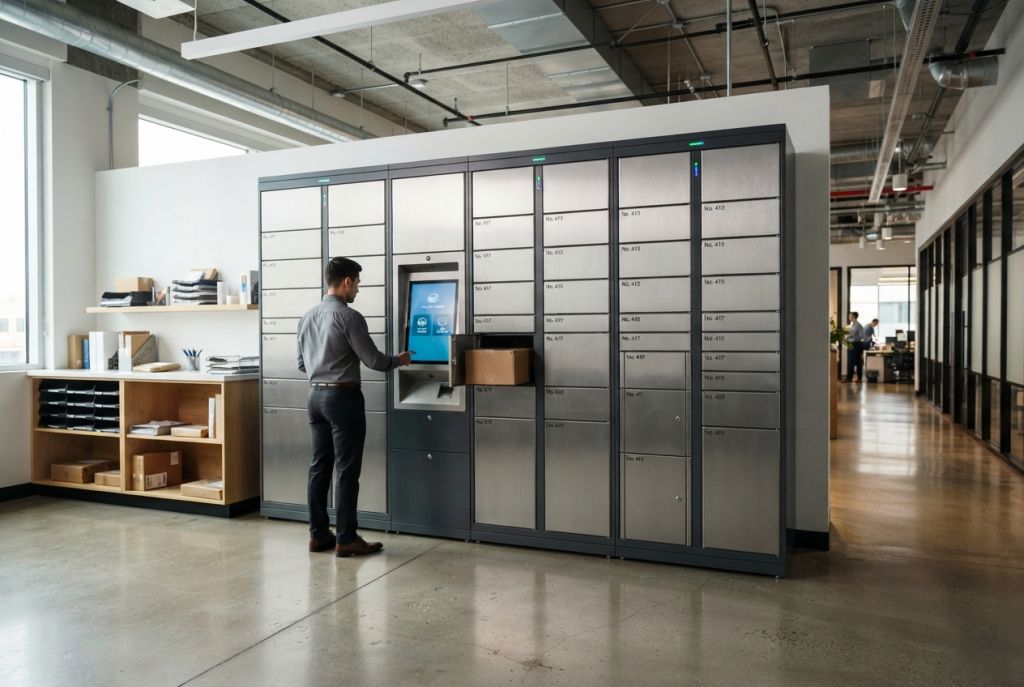
Smart lockers are electronically controlled storage compartments that use digital access methods — PIN codes, RFID cards, mobile apps, or biometric scanners — instead of traditional keys. Each locker transaction is tracked, creating a complete audit trail of who stored what, when, and who retrieved it.
Unlike standard lockers, smart lockers can be configured for:
- Package management — Automated delivery notification and pickup for offices, apartments, and universities
- Asset distribution — Controlled checkout of laptops, tools, radios, keys, and equipment
- Personal storage — Hot-desking environments where employees store belongings in any available locker
- Click-and-collect — Retailand library pickup orders
- Evidence and chain of custody — Law enforcement temporary evidence transfer
How Smart Locker Systems Work
The core components of a smart locker system:
- Locker hardware — Steel or powder-coated enclosures with electronic locks on each compartment. Available in various sizes from small phone-sized cubbies to full-height wardrobe compartments.
- Electronic locks — Solenoid or motor-driven locks controlled by the management system. Open via PIN, RFID, barcode, QR code, or mobile app.
- Control interface — Touchscreen kiosk or integrated panel for user interaction. Displays instructions, accepts credentials, and shows compartment status.
- Management software — Cloud-based or on-premise platform that tracks all transactions, sends notifications, generates reports, and integrates with other systems (HR, mail room, IT asset management).
- Notifications — Email, SMS, or app push notifications alert recipients when items are ready for pickup.
Smart Locker Applications by Industry
Corporate Offices & Coworking Spaces
With hybrid work and hot-desking, employees need secure personal storage without assigned desks. Smart lockers let any employee claim an available locker for the day via their badge or phone, then release it when they leave. Package lockers in the lobby handle the flood of personal deliveries without burdening the mail room.
Universities & Schools
Student smart lockers eliminate the hassle of combination locks, key replacement, and lock cutting at year-end. Students access lockers with their student ID cards. Administrators can remotely open, reassign, or disable lockers. Package lockers handle the growing volume of online shopping deliveries to campus.
Healthcare Facilities
Hospitals use smart lockers for supply distribution (scrubs, PPE, medications), employee personal storage, and secure document transfer between departments. Temperature-controlled smart lockers store pharmaceuticalsand specimens requiring chain of custody.
Government & Military
Secure asset distribution — radios, weapons, body cameras, laptops — with mandatory check-in/check-out and full audit trails. Meets government security requirements for accountability.
Warehouses & Manufacturing
Tool crib lockers distribute and track tools, safety equipment, and parts. Employees check out items with their badge, and the system tracks what’s out, who has it, and for how long. Reduces tool lossand ensures accountability.
Types of Smart Lockers
| Type | Use Case | Typical Sizes | Access Method |
|---|---|---|---|
| Package Lockers | Mail rooms, lobbies, apartments | Mixed (small to XL) | PIN, QR code, app |
| Day-Use Lockers | Hot-desking, gyms, coworking | Small to medium | Badge, PIN, app |
| Asset Lockers | IT, tools, equipment | Configured to asset size | Badge, biometric |
| Refrigerated Lockers | Food delivery, pharma | Medium | PIN, app |
| Evidence Lockers | Law enforcement | Pass-through design | Badge + PIN (dual auth) |
Smart Locker Features to Look For
- Multi-authentication — Support for badges, PINs, mobile, and biometric ensures compatibility with your existing systems
- Cloud management — Remote administration, real-time monitoring, and analytics from anywhere
- Integration APIs — Connect to your HR system, mail room software, asset management, or building access control
- Modular design — Add or reconfigure compartments as needs change without replacing the entire system
- ADA compliance — Lower compartments accessible to wheelchair users
- Offline fallback — System continues to function even if internet connection drops
- Reporting & analytics — Usage patterns, peak times, dwell times, and compliance reporting
Smart Locker Costand ROI
Smart locker pricing depends on the number of compartments, access technology, and software:
- Basic system (12-24 compartments) — $8,000-$15,000
- Mid-range (24-48 compartments) — $15,000-$30,000
- Enterprise (48+ compartments, full integration) — $30,000-$75,000+
- Software fees — $50-$200/month for cloud management (some vendors include this)
ROI drivers:
- Eliminates 1-2 FTE mail room staff for package management ($50K-$100K/year)
- Reduces tool/equipment loss by 30-50%
- Saves 10-15 minutes per employee per day in hot-desking environments
- Typical payback period: 12-24 months
Frequently Asked Questions
How secure are smart lockers?
Smart lockers are more secure than traditional key lockers. Electronic locks can’t be picked, credentials can be instantly revoked, and every access is logged. Enterprise systems add features like dual authentication, anti-tamper alerts, and surveillance camera integration.
Can smart lockers work without WiFi?
Most modern smart locker systems have offline capability — they cache credentialsand continue operating if the network goes down. Transactions sync when connectivity returns. Hardwired Ethernet connections provide the most reliable connectivity.
How long does smart locker installation take?
A typical 24-48 compartment system installs in 1-2 days. Larger deployments with network integration, custom software configuration, and employee training take 1-2 weeks. Pre-configured units can be operational within hours of delivery.
Can I start smalland expand later?
Yes — modular smart locker systems are designed for expansion. You can start with a single bank and add more compartments as demand grows. The management software scales automatically.
What happens if the power goes out?
Most smart locker systems include battery backup that maintains lock statusand allows emergency access during power outages. Some systems default to locked (secure mode) while others default to unlocked (access mode).
Related Resources
- Smart Locker Systems — Products & Pricing
- Utah Locker Solutions
- Utah Parcel Lockers
- Security Cages & Wire Partitions
- Get a Free Quote
Need Help Choosing a Smart Locker System?
Material Handling USA helps organizations select, configure, and install smart locker systems. We’ll match the right solution to your specific workflow and budget.
Call: (800) 326-4403
Email: sales@mh-usa.com
Online Store
Shop at MaterialHandling-USA.com
Shop lockersand secure storage solutions online:
Storage Cabinets
Browse 3,000+ locker options →